Monday, November 26, 2018

Half of all Phishing Sites Now Have the Padlock

Maybe you were once advised to “look for the padlock” as a means of telling legitimate e-commerce sites from phishing or malware traps. Unfortunately, this has never been more useless advice. New research indicates that half of all phishing scams are now hosted on Web sites whose Internet address includes the padlock and begins with “https://”.
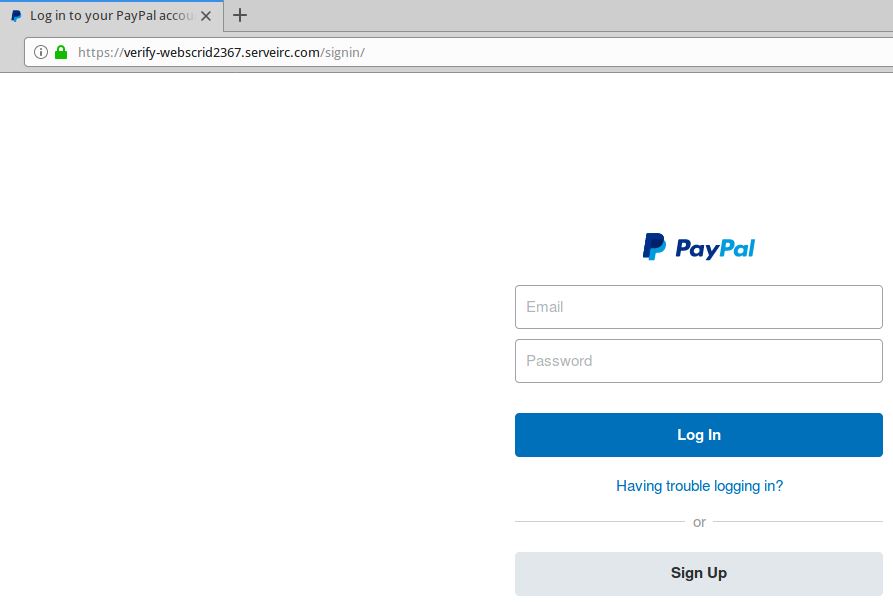
A live Paypal phishing site that uses https:// (has the green padlock).

Recent data from anti-phishing company PhishLabs shows that 49 percent of all phishing sites in the third quarter of 2018 bore the padlock security icon next to the phishing site domain name as displayed in a browser address bar. That’s up from 25 percent just one year ago, and from 35 percent in the second quarter of 2018.

This alarming shift is notable because a majority of Internet users have taken the age-old “look for the lock” advice to heart, and still associate the lock icon with legitimate sites. A PhishLabs survey conducted last year found more than 80% of respondents believed the green lock indicated a website was either legitimate and/or safe.

In reality, the https:// part of the address (also called “Secure Sockets Layer” or SSL) merely signifies the data being transmitted back and forth between your browser and the site is encrypted and can’t be read by third parties. The presence of the padlock does not mean the site is legitimate, nor is it any proof the site has been security-hardened against intrusion from hackers.
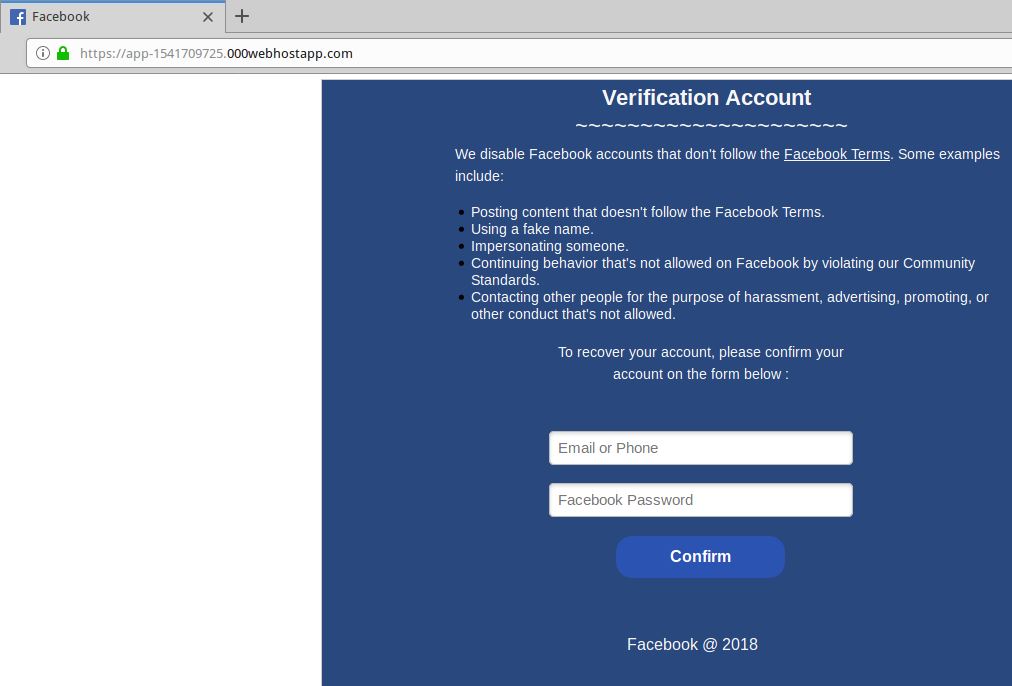
A live Facebook phish that uses SSL (has the green padlock).

Most of the battle to combat cybercrime involves defenders responding to offensive moves made by attackers. But the rapidly increasing adoption of SSL by phishers is a good example in which fraudsters are taking their cue from legitimate sites.

“PhishLabs believes that this can be attributed to both the continued use of SSL certificates by phishers who register their own domain names and create certificates for them, as well as a general increase in SSL due to the Google Chrome browser now displaying ‘Not secure’ for web sites that do not use SSL,” said John LaCour, chief technology officer for the company. “The bottom line is that the presence or lack of SSL doesn’t tell you anything about a site’s legitimacy.”

The major Web browser makers work with a number of security organizations to index and block new phishing sites, often serving bright red warning pages that flag the page of a phishing scam and seek to discourage people from visiting the sites. But not all phishing scams get flagged so quickly.

I spent a few minutes browsing phishtank.com for phishing sites that use SSL, and found this cleverly crafted page that attempts to phish credentials from users of Bibox, a cryptocurrency exchange. Click the image below and see if you can spot what’s going on with this Web address:
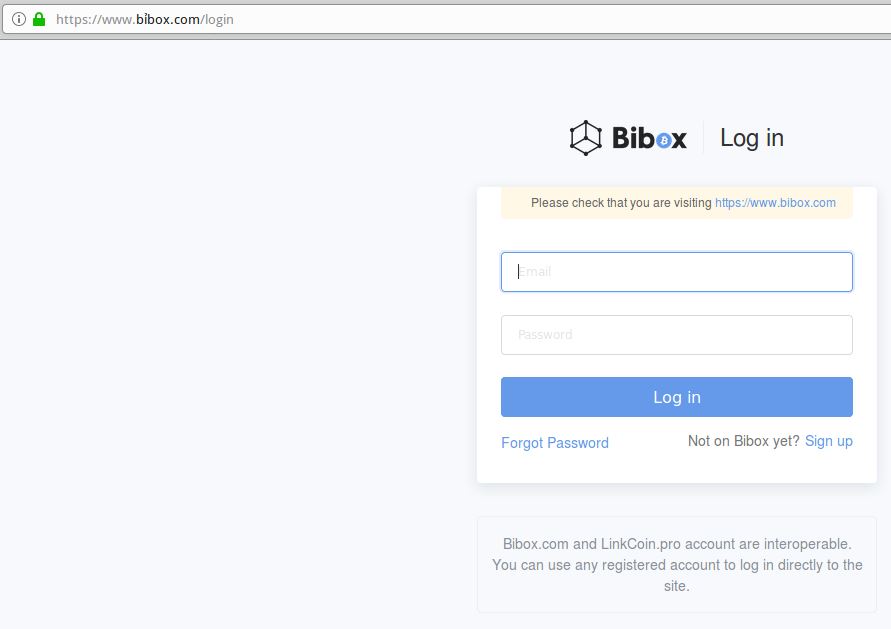
This live phish targets users of cryptocurrency exchange Bibox. Look carefully at the URL in the address bar, and you’ll notice a squiggly mark over the “i” in Bibox. This is an internationalized domain name, and the real address is https://www.xn--bbox-vw5a[.]com/login

Load the live phishing page at https://www.xn--bbox-vw5a[.]com/login (that link has been hobbled on purpose) in Google Chrome and you’ll get a red “Deceptive Site Ahead” warning. Load the address above — known as “punycode” — in Mozilla Firefox and the page renders just fine, at least as of this writing.

This phishing site takes advantage of internationalized domain names (IDNs) to introduce visual confusion. In this case, the “i” in Bibox.com is rendered as the Vietnamese character “ỉ,” which is extremely difficult to distinguish in a URL address bar.

As KrebsOnSecurity noted in March, while Chrome, Safari and recent versions of Microsoft’s Internet Explorer and Edge browsers all render IDNs in their clunky punycode state, Firefox will happily convert the code to the look-alike domain as displayed in the address bar.

If you’re a Firefox (or Tor) user and would like Firefox to always render IDNs as their punycode equivalent when displayed in the browser address bar, type “about:config” without the quotes into a Firefox address bar.
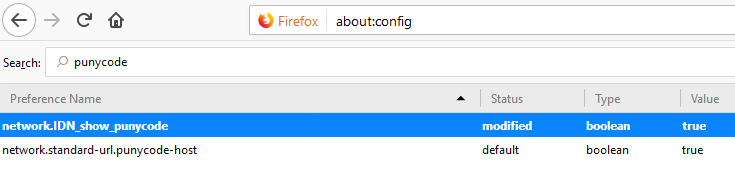
Then in the “search:” box type “punycode,” and you should see one or two options there. The one you want is called “network.IDN_show_punycode.” By default, it is set to “false”; double-clicking that entry should change that setting to “true.”


from
https://krebsonsecurity.com/2018/11/half-of-all-phishing-sites-now-have-the-padlock/

Friday, November 23, 2018

How to Shop Online Like a Security Pro

‘Tis the season when even those who know a thing or two about Internet scams tend to let down their guard in the face of an eye-popping discount or the stress of last-minute holiday shopping. So here’s a quick refresher course on how to make it through the next few weeks without getting snookered online.

Adopting a shopping strategy of simply buying from the online merchant with the lowest advertised prices can be a bit like playing Russian Roulette with your wallet, for the simple reason that there are tons of completely fake e-commerce sites out there looking to separate the unwary from their credit card details.

Even people who shop mainly at big-name online stores can get scammed if they’re not wary of too-good-to-be-true offers. For example, KrebsOnSecurity got taken for hundreds of dollars just last year after trying to buy a pricey Sonos speaker from an established Amazon merchant who was selling it new and unboxed at huge discount.

I later received an email from the seller, who said his Amazon account had been hacked and abused by scammers to create fake sales. Amazon ultimately refunded the money, but if this happens to you around the holidays it could derail plans to get all your shopping done before the expected gift-giving day arrives.

Here are some other safety and security tips to keep in mind when shopping online:

-WHEN IN DOUBT, CHECK ‘EM OUT: If you don’t know much about the online merchant that has the item you wish to buy, take a few minutes to investigate its reputation. After all, it’s not uncommon for bargain basement phantom Web sites to materialize during the holiday season, and then vanish forever not long afterward.

If you’re buying from an online store that is brand new, the risk that you will get scammed increases significantly.  How do you know the lifespan of a site selling that must-have gadget at the lowest price? One easy way to get a quick idea is to run a basic WHOIS search on the site’s domain name. The more recent the site’s “created” date, the more likely it is a phantom store.

-USE A CREDIT CARD: It’s nearly impossible for consumers to tell how secure a main street or online merchant is, and safety seals or attestations that something is “hacker safe” are a guarantee of nothing. In my experience, such sites are just as likely to be compromised as e-commerce sites without these dubious security seals.

No, it’s best just to shop as if they’re all compromised. With that in mind, if you have the choice between using a credit or debit card, shop with your credit card.

Sure, the card associations and your bank are quick to point out that you’re not liable for fraudulent charges that you report in a timely manner, whether it’s debit or a credit card. But this assurance may ring hollow if you wake up one morning to find your checking accounts emptied by card thieves after shopping at a breached merchant with a debit card.

Who pays for the fees levied against you by different merchants when your checks bounce? You do. Does the bank reimburse you when your credit score takes a ding because your mortgage or car payment was late? Don’t hold your breath.

-PADLOCK, SCHMADLOCK: For years, consumers have been told to look for the padlock when shopping online. Maybe this was once sound advice. But to my mind, the “look for the lock” mantra has created a false sense of security for many Internet users, and has contributed to a dangerous and widespread misunderstanding about what the lock icon is really meant to convey.

To be clear, you absolutely should run away from any e-commerce site that does not include the padlock (i.e., its Web address does not begin with “https://”).  But the presence of a padlock icon next to the Web site name in your browser’s address bar does not mean the site is legitimate. Nor is it any sort of testimonial that the site has been security-hardened against intrusion from hackers.

The https:// part of the address merely signifies that the data being transmitted back and forth between your browser and the site is encrypted and can’t be read by third parties. Even so, anti-phishing company PhishLabs found in a survey last year that more than 80% of respondents believed the green lock indicated that a website was either legitimate and/or safe.

Now that anyone can get SSL certificates for free, phishers and other scammers that ply their trade via fake Web sites are starting to up their game. In December 2017, PhishLabs estimated that a quarter of all phishing Web sites were outfitting their scam pages with SSL certificates to make them appear more trustworthy. That percentage has almost certainly increased a year later.

-CHCEK THE SHIPPING

Often times, items that are advertised at steeper discounts than other online stores make up for it by charging way more than normal for shipping and handling.

Be careful what you agree to: Check to make sure you know how long the item will take to be shipped, and that you understand the store’s return policies. Also, keep an eye out for hidden surcharges, and be wary of blithely clicking “ok” during the checkout process.

-DON’T TAKE THE BAIT

Be on guard against phishing and malware schemes that take advantage of shopper distraction and frenzy during the holidays. In years past we’ve seen both leverage emails crafted to look like they were sent from a name-brand store claiming that there was a problem with your order or some component of the shipping process.

One perennial phishing and malware scam that seems to kick into high gear around the holidays is spam that purports to have been sent by the U.S. Postal Service, FedEx, UPS or some other shipping service, warning of a wayward package.

When in doubt about such a message, visit the e-commerce or shipping site directly, and avoid clicking on links or attachments in email — particularly missives that warn of some dire consequences unless you act quickly. Phishers and malware purveyors typically seize upon some kind of emergency to create a false alarm that often causes recipients to temporarily let their guard down.

-SCOUR YOUR STATEMENTS

Some credit card companies offer cardholders that ability to use “virtual credit cards” — apps that generate a unique, ephemeral credit card number that is good for just one purchase or for a short period of time. The idea being that if fraudsters compromise the virtual card number, your bank doesn’t have to issue you a new card and you won’t have the headache that comes with entering new card details at all of the sites where you’ve set up automatic monthly payments.

These virtual cards are nice in theory, but I’ve never been a big fan. Probably because in many cases they require users to have risky add-ons installed and enabled — like Java or Flash Player. But, hey, if this works for you, great.

Most importantly, keep a close eye on your monthly statements. If I were a fraudster, I’d most definitely wait until the holidays to cram through a bunch of unauthorized charges on stolen cards, so that the bogus purchases would get buried amid a flurry of other legitimate transactions. That’s why it’s key to closely review your credit card bill and to quickly dispute any charges you didn’t authorize.

-BUDDY UP

If you’re planning to spend time with friends and family this holiday season, consider giving the gift of your time and helping out with a security checkup. This might involve making sure that new or old PC has up-to-date security software and the requisite software patches, or locking down their wireless router by enabling security features and disabling risky ones.

If you’re visiting parents or older relatives, consider helping them plant their flags at various online sites and services if they haven’t already done so, such as at the Social Security Administration, the U.S. Postal Service, or their wireless phone provider and/or Internet Service Provider (ISP).

You’d definitely make it off of Santa’s naughty list if you helped your loved ones take stock of which online accounts could benefit from more robust multi-factor authentication — and perhaps even guiding them away from SMS/text messages for multifactor toward more secure app- or key-based options, where available. You might even take a minute to explain the perils of re-using passwords across multiple sites, and see if they’re interested in using a password manager.

While you’re at it, ask your friends and family if they’ve frozen their credit files at the major consumer credit bureaus. If not, talk with them about what this entails and how it can help ward off identity theft. If they’re game, you might even consider helping them set it up and ensuring that freeze PINs are securely stored so the information is easily available when and if their credit files ever need to be thawed.


from
https://krebsonsecurity.com/2018/11/how-to-shop-online-like-a-security-pro/

Wednesday, November 21, 2018

USPS Site Exposed Data on 60 Million Users

U.S. Postal Service just fixed a security weakness that allowed anyone who has an account at usps.com to view account details for some 60 million other users, and in some cases to modify account details on their behalf.

Image: USPS.com

KrebsOnSecurity was contacted last week by a researcher who discovered the problem, but who asked to remain anonymous. The researcher said he informed the USPS about his finding more than a year ago yet never received a response. After confirming his findings, this author contacted the USPS, which promptly addressed the issue.

The problem stemmed from an authentication weakness in a USPS Web component known as an “application program interface,” or API — basically, a set of tools defining how various parts of an online application such as databases and Web pages should interact with one another.

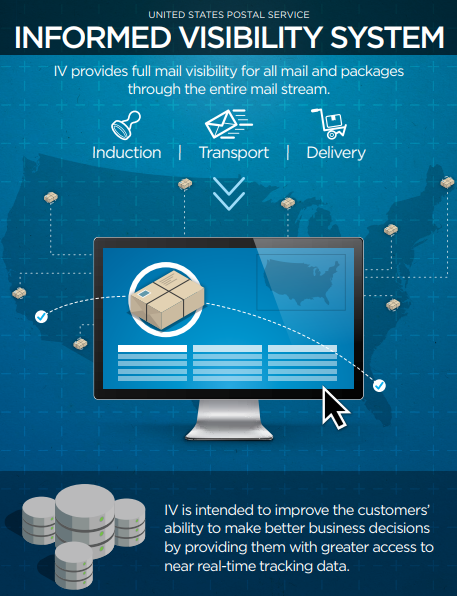
The API in question was tied to a Postal Service initiative called “Informed Visibility,” which according to the USPS is designed to let businesses, advertisers and other bulk mail senders “make better business decisions by providing them with access to near real-time tracking data” about mail campaigns and packages.

In addition to exposing near real-time data about packages and mail being sent by USPS commercial customers, the flaw let any logged-in usps.com user query the system for account details belonging to any other users, such as email address, username, user ID, account number, street address, phone number, authorized users, mailing campaign data and other information.

Many of the API’s features accepted “wildcard” search parameters, meaning they could be made to return all records for a given data set without the need to search for specific terms. No special hacking tools were needed to pull this data, other than knowledge of how to view and modify data elements processed by a regular Web browser like Chrome or Firefox.

A USPS brochure advertising the features and benefits of Informed Visibility.

In cases where multiple accounts shared a common data element — such as a street address — using the API to search for one specific data element often brought up multiple records. For example, a search on the email addresses for readers who volunteered to help with this research turned up multiple accounts when those users had more than one user signed up at the same physical address.

“This is not good,” said one anonymous reader who volunteered to help with this research, after viewing a cut-and-paste of his USPS account details looked up via his email address. “Especially since we moved due to being threatened by a neighbor.”

Nicholas Weaver, a researcher at the International Computer Science Institute and lecturer at UC Berkeley, said the API should have validated that the account making the request had permission to read the data requested.

“This is not even Information Security 101, this is Information Security 1, which is to implement access control,” Weaver said. “It seems like the only access control they had in place was that you were logged in at all. And if you can access other peoples’ data because they aren’t enforcing access controls on reading that data, it’s catastrophically bad and I’m willing to bet they’re not enforcing controls on writing to that data as well.”

A cursory review by KrebsOnSecurity indicates the promiscuous API let any user request account changes for any other user, such as email address, phone number or other key details.

Fortunately, the USPS appears to have included a validation step to prevent unauthorized changes — at least with some data fields. Attempts to modify the email address associated with my USPS account via the API prompted a confirmation message sent to the email address tied to that account (which required clicking a link in the email to complete the change).

It does not appear USPS account passwords were exposed via this API, although KrebsOnSecurity conducted only a very brief and limited review of the API’s rather broad functionality before reporting the issue to the USPS. The API at issue resides here; a copy of the API prior to its modification on Nov. 20 by the USPS is available here as a text file.

The ability to modify database entries related to Informed Visibility user accounts could create problems for the USPS’s largest customers — think companies like Netflix and others that get discounted rates for high volumes. For instance, the API allowed any user to convert regular usps.com accounts to Informed Visibility business accounts, and vice versa.

Spammers and email scam artists also could have a field day with this USPS vulnerability, said Robert Hansen, chief technology officer at Bit Discovery, a security firm in Austin, Texas.

“This could easily be leveraged to build up mass targeted spam or spear phishing,” Hansen said. “It should have been protected via authentication and validated against the logged in user in question.”

According to a somewhat redacted vulnerability assessment of Informed Visibility (PDF) published in October 2018 by the USPS’s Office of Inspector General (OIG), auditors found a number of authentication and encryption weaknesses in the service. But they seemed to have overlooked this rather glaring security problem. The USPS told the OIG it had addressed the authentication problems raised in the audit report, which appear to have been related to how data was encrypted in transit.

The API vulnerability is the latest security stumble for the Postal Service’s efforts to modernize operations. The Informed Visibility program is the sister initiative to the USPS’s Informed Delivery service, which lets residents view scanned images of all incoming mail. The API vulnerability affected all usps.com users, including some 13 million Informed Delivery users.

As detailed in numerous stories here, Informed Delivery has struggled to implement security features that might prevent abuse of the system by identity thieves and other ne’er-do-wells.

Earlier this month, KrebsOnSecurity broke the news that the U.S. Secret Service issued an internal memo about identity thieves abusing Informed Delivery to aid in mail theft. The story cited cases in multiple states involving scammers who ordered new credit cards in the names of victims, and then signed up as those victims at Informed Delivery once the cards were sent — thereby allowing the thieves to tell exactly when the new credit cards would be arriving in the mail.

Although fixing information disclosure and authentication weaknesses is often quite simple, it’s remarkable how many organizations that should know better don’t invest the resources needed to find and address them. In September, this author detailed how a company used by thousands of state and local governments to accept online payments was leaking more than 14 million records.

In August, KrebsOnSecurity disclosed a similar flaw at work across hundreds of small bank Web sites run by Fiserv, a major provider of technology services to financial institutions.

In July, identity theft protection service LifeLock corrected an information disclosure flaw that exposed the email address of millions of subscribers. And in April 2018, PaneraBread.com remedied a weakness exposing millions of customer names, email and physical addresses, birthdays and partial credit card numbers.

Got a tip about a security vulnerability similar to those detailed above, or perhaps something more serious? Please drop me a note at krebsonsecurity @ gmail.com.


from
https://krebsonsecurity.com/2018/11/usps-site-exposed-data-on-60-million-users/

Wednesday, November 14, 2018

Calif. Man Pleads Guilty in Fatal Swatting Case, Faces 20+ Years in Prison

A California man who pleaded guilty Tuesday to causing dozens of swatting attacks — including a deadly incident in Kansas last year — now faces 20 or more years in prison.

Tyler Raj Barriss, in an undated selfie.

Tyler Barriss, 25, went by the nickname SWAuTistic on Twitter, and reveled in perpetrating “swatting” attacks. These dangerous hoaxes involve making false claims to emergency responders about phony hostage situations or bomb threats, with the intention of prompting a heavily-armed police response to the location of the claimed incident.

On Dec. 28, 2017, Barriss placed a call from California to police in Wichita, Kansas, claiming that he was a local resident who’d just shot his father and was holding other family members hostage.

When Wichita officers responded to the address given by the caller — 1033 W. McCormick — they shot and killed 28-year-old Andrew Finch, a father of two who had done nothing wrong.

Barriss admitted setting that fatal swatting attack in motion after getting in the middle of a dispute between two Call of Duty gamers, 18-year-old Casey Viner from Ohio and Shane Gaskill, 20, from Wichita.

Viner allegedly asked Barriss to swat Gaskill. But when Gaskill noticed Barriss’ Twitter account (@swattingaccount) suddenly following him online, he tried to deflect the attack. Barriss says Gaskill allegedly dared him to go ahead with the swat, but then gave Barriss an old home address — 1033 W. McCormick — which was then being occupied by Finch’s family.

Viner and Gaskill are awaiting trial. A more detailed account of their alleged dispute is told here.

According to the Justice Department, Barriss pleaded guilty to making hoax bomb threats in phone calls to the headquarters of the FBI and the Federal Communications Commission in Washington, D.C. He also made bomb threat and swatting calls from Los Angeles to emergency numbers in Ohio, New Hampshire, Nevada, Massachusetts, Illinois, Utah, Virginia, Texas, Arizona, Missouri, Maine, Pennsylvania, New Mexico, New York, Michigan, Florida and Canada.

U.S. Attorney Stephen McAllister said Barriss faces 20 years or more in prison. Barriss is due to be sentenced Jan. 30, 2019.

Many readers following this story over the past year have commented here that the officer who fired the shot which killed Andrew Finch should also face prosecution. However, the district attorney for the county that encompasses Wichita decided in April that the officer will not face charges, and will not be named because he isn’t being charged with a crime.

As the victim of a swatting attack in 2013 and two other attempted swattings, I’m glad to finally see a swatting prosecution that may actually serve as a deterrent to this idiotic and extremely dangerous crime going forward.

It’s also great to see police departments like Seattle’s taking steps to help head off swatting incidents before they happen. Last month, the Seattle Police 911 Center launched a new program that lets residents register their address and corresponding concerns if they feel they may be the target of swatting.

But it would also be nice if more police forces around the country received additional training on exercising restraint in the use of deadly force, particularly in responding to hostage or bomb threat scenarios that have hallmarks of a swatting hoax.

For example, perpetrators of swatting often call non-emergency numbers at state and local police departments to carry out their crimes precisely because they are not local to the region and cannot reach the target’s police department by calling 911. This is exactly what Tyler Barriss did in the Wichita case and others. Swatters also often use text-to-speech (TTY) services for the hearing impaired to relay hoax swat calls, as was the case with my 2013 swatting.


from
https://krebsonsecurity.com/2018/11/calif-man-pleads-guilty-in-fatal-swatting-case-faces-20-years-in-prison/

Patch Tuesday, November 2018 Edition

Microsoft on Tuesday released 16 software updates to fix more than 60 security holes in various flavors of Windows and other Microsoft products. Adobe also has security patches available for Flash Player, Acrobat and Reader users.

As per usual, most of the critical flaws — those that can be exploited by malware or miscreants without any help from users — reside in Microsoft’s Web browsers Edge and Internet Explorer.
This week’s patch batch addresses two flaws of particular urgency: One is a zero-day vulnerability (CVE-2018-8589) that is already being exploited to compromise Windows 7 and Server 2008 systems.

The other is a publicly disclosed bug in Microsoft’s Bitlocker encryption technology (CVE-2018-8566) that could allow an attacker to get access to encrypted data. One mitigating factor with both security holes is that the attacker would need to be already logged in to the targeted system to exploit them.

Of course, if the target has Adobe Reader or Acrobat installed, it might be easier for attackers to achieve that log in. According to analysis from security vendor Qualys, there is now code publicly available that could force these two products to leak a hash of the user’s Windows password (which could then be cracked with open-source tools). A new update for Acrobat/Reader fixes this bug, and Adobe has published some mitigation suggestions as well.

In addition, Adobe pushed out a security update for Windows, Mac, Linux and Chrome versions of Flash Player. The update fixes just one vulnerability in Flash, but I’m sure most of us would rather Flash died off completely already. Adobe said it plans to end support for the plugin in 2020. Google Chrome is now making users explicitly enable Flash every time they want to use it, and by the summer of 2019 it will make users go into their settings to enable it every time they want to run it.

KrebsOnSecurity has frequently suggested that Windows users wait a day or two after Microsoft releases monthly security updates before installing the fixes, with the rationale that occasionally buggy patches can cause serious headaches for users who install them before all the kinks are worked out.

Windows 10 likes to install patches all in one go and reboot your computer on its own schedule. Microsoft doesn’t make it easy for Windows 10 users to change this setting, but it is possible. For all other Windows OS users, if you’d rather be alerted to new updates when they’re available so you can choose when to install them, there’s a setting for that in Windows Update.

In either case, it’s a good idea to get in the habit of backing up your data before installing Windows updates. Unlike last month, when many Windows users saw the contents of their “My Documents” folder erased by a buggy update, I’m not aware of any major issues this time around.

If you experience any problems installing any of these patches this month, please feel free to leave a comment about it below; there’s a good chance other readers have experienced the same and may even chime in here with some helpful tips.


from
https://krebsonsecurity.com/2018/11/patch-tuesday-november-2018-edition/

Tuesday, November 13, 2018

That Domain You Forgot to Renew? Yeah, it’s Now Stealing Credit Cards

If you own a domain name that gets decent traffic and you fail to pay its annual renewal fee, chances are this mistake will be costly for you and for others. Lately, neglected domains have been getting scooped up by crooks who use them to set up fake e-commerce sites that steal credit card details from unwary shoppers.

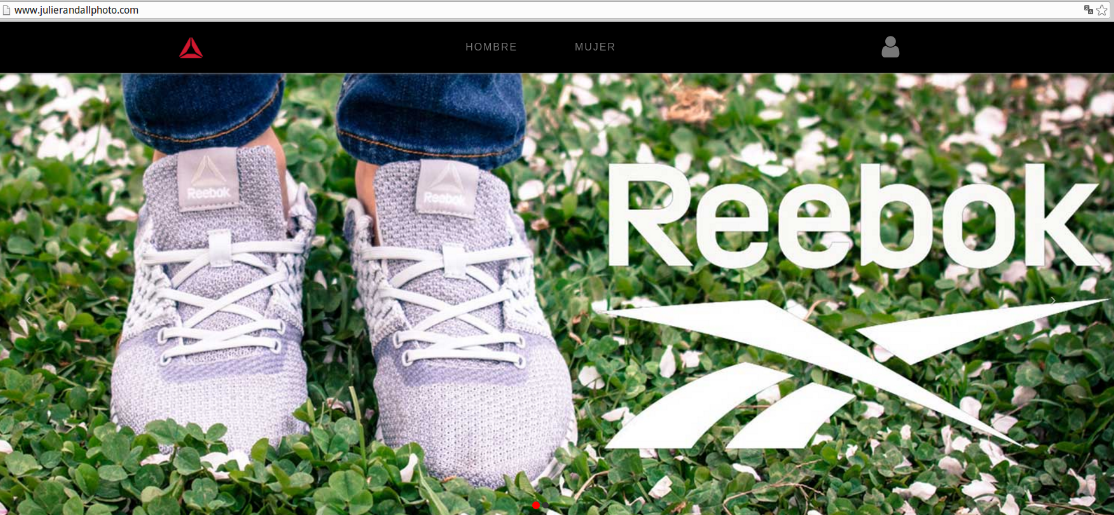
For nearly 10 years, Portland, Ore. resident Julie Randall posted pictures for her photography business at julierandallphotos-dot-com, and used an email address at that domain to communicate with clients. The domain was on auto-renew for most of that time, but a change in her credit card details required her to update her records at the domain registrar — a task Randall says she now regrets putting off.

Julierandallphoto-dot-com is now one of hundreds of fake ecommerce sites set up to steal credit card details.

That’s because in June of this year the domain expired, and control over her site went to someone who purchased it soon after. Randall said she didn’t notice at the time because she was in the middle of switching careers, didn’t have any active photography clients, and had gotten out of the habit of checking that email account.

Randall said she only realized she’d lost her domain after failing repeatedly to log in to her Instagram account, which was registered to an email address at julierandallphoto-dot-com.

“When I tried to reset the account password through Instagram’s procedure, I could see that the email address on the account had been changed to a .ru email,” Randall told KrebsOnSecurity. “I still don’t have access to it because I don’t have access to the email account tied to my old domain. It feels a little bit like the last ten years of my life have kind of been taken away.”

Visit julierandallphoto.com today and you’ll see a Spanish language site selling Reebok shoes (screenshot above). The site certainly looks like a real e-commerce shop; it has plenty of product pages and images, and of course a shopping cart. But the site is noticeably devoid of any SSL certificate (the entire site is http://, not https://), and the products for sale are all advertised for roughly half their normal cost.

A review of the neighboring domains that reside at Internet addresses adjacent to julierandallphoto-dot-com (196.196.152/153.x, etc.) shows hundreds of other domains that were apparently registered upon expiration over the past few months and which now feature similar http-only online shops in various languages pimping low-priced, name brand shoes and other clothing.

Until earlier this year, wildcatgroomers-dot-com belonged to a company in Wisconsin that sold equipment for grooming snowmobile trails. It’s now advertising running shoes. Likewise, kavanaghsirishpub-dot-com corresponded to a pub and restaurant in Tennessee until mid-2018; now it’s pretending to sell cheap Nike shoes.

So what’s going here?

According to an in-depth report jointly released today by security firms Flashpoint and RiskIQ, the sites are almost certainly set up simply to siphon payment card data from unwary shoppers looking for specific designer footwear and other clothing at bargain basement prices.

“We have observed more than 800 sites hosting these brand impersonation/skimming stores since June 2018,” the report notes.

“This group’s strategy appears rather simple: the perpetrators set up a large number of stores impersonating as many popular brands as possible and drive traffic to these fake stores with a variety of methods,” the report continues. “Some visitors will attempt to make purchases, entering their payment information into the payment form where the skimmer copies it and sends it to a drop server. The payment page even displays badges from various security companies in order to appear more legitimate.”

The report tracks the work of Magecart — the name given to a collective of at least seven cybercrime groups involved in hacking Web sites to steal payment card data. On Nov. 4, KrebsOnSecurity published Who’s in Your Online Shopping Cart?, which looked at a network of hacked sites that fit the Magecart profile.

Credit card data stolen by these various Magecart groups invariably gets put up for sale at online cybercrime shops, the security firms found. In addition, some Magecart actors will sell access to hacked online stores, allowing crooks who buy this access to receive a live feed of freshly-stolen payment card details for as long as the site remains compromised.

Flashpoint and RiskIQ say they have been working with two other non-commercial anti-abuse organizations, Abuse.ch and Shadowserver to “sinkhole” or quietly assume control over hacked domains that are used for Magecart activities. These latter two organizations provide automated reporting to affected organizations. Anyone responsible for managing a range of Internet addresses can sign up at Shadowserver.org to have those ranges monitored for domains compromised by Magecart tools.

Meanwhile, as Julie Randall’s experience shows, it pays to stay on top of any domain registrations you may have. Giving up on a long-held domain name — particularly one tied to your name — is always a tough call, because you simply never know what it will be used for when it falls into someone else’s hands.

If you’re on the fence about whether to renew a domain and it’s one of several you own, it may make sense to hold onto it and simply forward any incoming traffic to a domain you do want people to visit. In the event you decide to relinquish a domain, make sure you take stock of any online accounts you created with email addresses tied to that domain and move those to another email address, as those accounts will likely come under someone else’s control when the domain expires.


from
https://krebsonsecurity.com/2018/11/that-domain-you-forgot-to-renew-yeah-its-now-stealing-credit-cards/

Friday, November 9, 2018

Bug Bounty Hunter Ran ISP Doxing Service

A Connecticut man who’s earned bug bounty rewards and public recognition from top telecom companies for finding and reporting security holes in their Web sites secretly operated a service that leveraged these same flaws to sell their customers’ personal data, KrebsOnSecurity has learned.

In May 2018, ZDNet ran a story about the discovery of a glaring vulnerability in the Web site for wireless provider T-Mobile that let anyone look up customer home addresses and account PINs. The story noted that T-Mobile disabled the feature in early April after being alerted by a 22-year-old “security researcher” named Ryan Stevenson, and that the mobile giant had awarded Stevenson $1,000 for reporting the discovery under its bug bounty program.

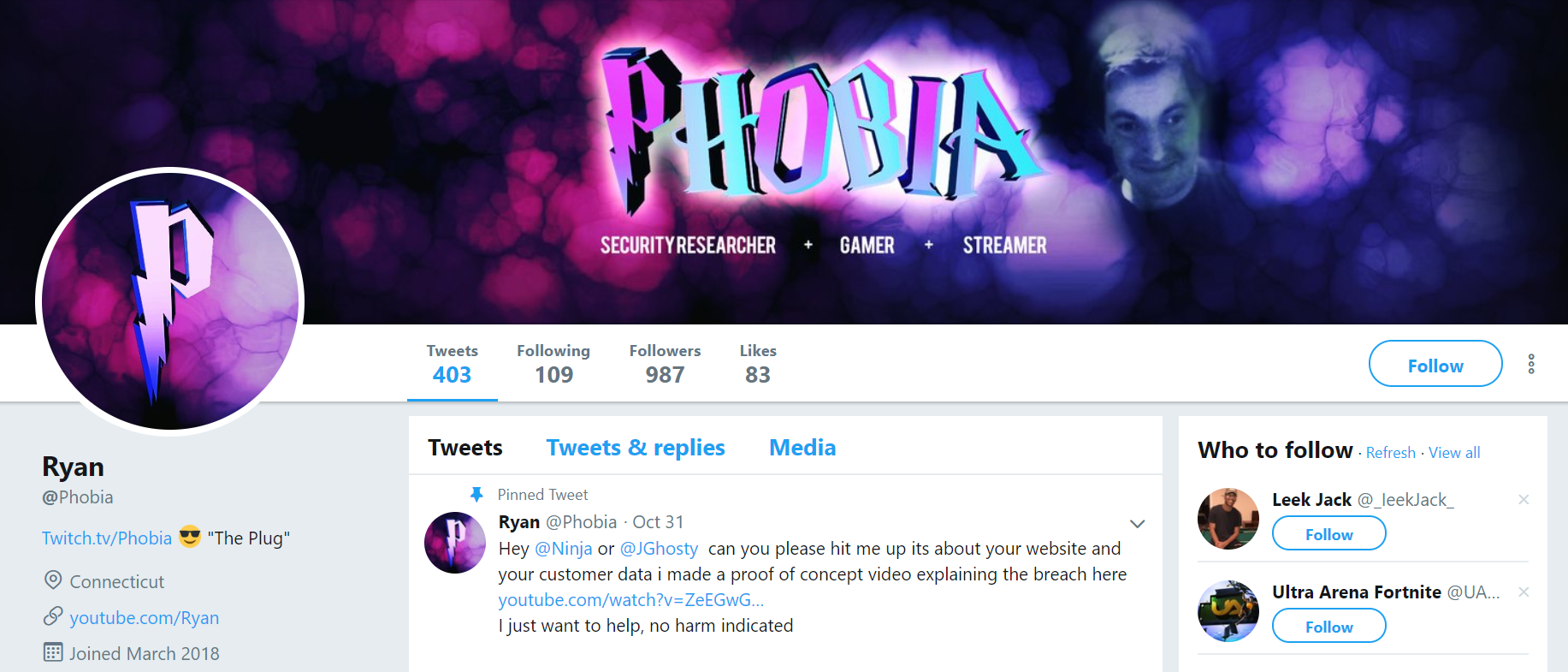
The Twitter account @phobia, a.k.a. Ryan Stevenson. The term “plug” referenced next to his Twitch profile name is hacker slang for employees at mobile phone stores who can be tricked or bribed into helping with SIM swap attacks.

Likewise, AT&T has recognized Stevenson for reporting security holes in its services. AT&T’s bug bounty site lets contributors share a social media account or Web address where they can be contacted, and in Stevenson’s case he gave the now-defunct Twitter handle “@Phoobia.”

Stevenson’s Linkedin profile — named “Phobias” — says he specializes in finding exploits in numerous Web sites, including hotmail.com, yahoo.com, aol.com, paypal.com and ebay.com. Under the “contact info” tab of Stevenson’s profile it lists the youtube.com account of “Ryan” and the Facebook account “Phobia” (also now deleted).

Coincidentally, I came across multiple variations on this Phobia nickname as I was researching a story published this week on the epidemic of fraudulent SIM swaps, a complex form of mobile phone fraud that is being used to steal millions of dollars in cryptocurrencies.

Unauthorized SIM swaps also are often used to hijack so-called “OG” user accounts — usually short usernames on top social network and gaming Web sites that are highly prized by many hackers because they can make the account holder appear to have been a savvy, early adopter of the service before it became popular and before all of the short usernames were taken. Some OG usernames can be sold for thousands of dollars in underground markets.

This week’s SIM swapping story quoted one recent victim who lost $100,000 after his mobile phone number was briefly stolen in a fraudulent SIM swap. The victim said he was told by investigators in Santa Clara, Calif. that the perpetrators of his attack were able to access his T-Mobile account information using a specialized piece of software that gave them backdoor access to T-Mobile’s customer database.

Both the Santa Clara investigators and T-Mobile declined to confirm or deny the existence of this software. But their non-denials prompted me to start looking for it on my own. So naturally I began searching at ogusers-dot-com, a forum dedicated to the hacking, trading and sale of OG accounts. Unsurprisingly, ogusers-dot-net also has traditionally been the main stomping grounds for many individuals involved in SIM swapping attacks.

It didn’t take long to discover an account on ogusers-dot-com named “Ryan,” who for much of 2018 has advertised a number of different “doxing” services — specifically those aimed at finding the personal information of customers at major broadband and telecom companies.

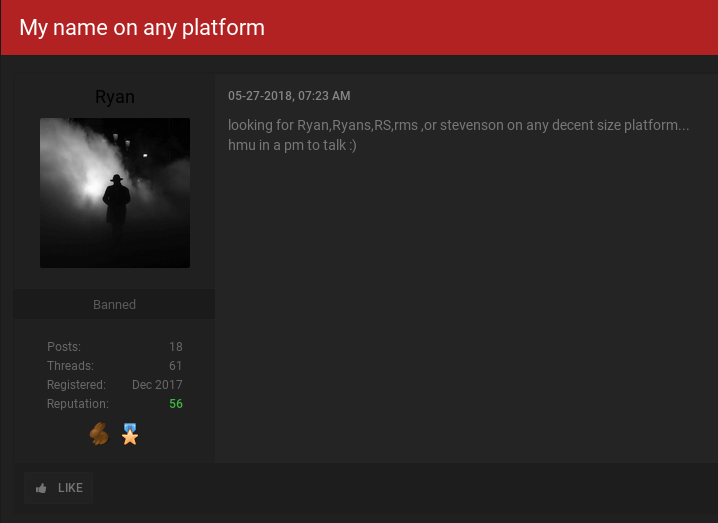
In some of Ryan’s sales threads, fellow forum members refer to him as “Phob” or “Phobs.” In a post on May 27, Ryan says he’s willing to pay or trade for OG accounts under the name “Ryan,” “Ryans”, “RS,” “RMS” or “Stevenson” on any decent sized popular Web site. “hmu [hit me up] in a pm [private message] to talk,” Ryan urged fellow forum members.

The OG User forum account “Ryan” asking fellow members to sell or trade him any major Web site account name that includes the OG username “Ryan” or “Stevenson.”

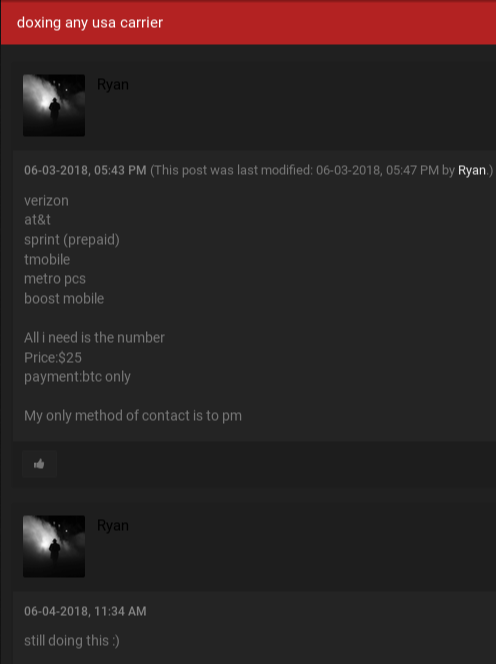
I found that as late as June 2018 Ryan was offering a service that he claimed was capable of “doxing any usa carrier,” including Verizon, AT&T, Sprint, T-Mobile, MetroPCS and Boost Mobile.

“All I need is the number,” Ryan said of his customer data lookup service, which he sold for $25 per record. “Payment BTC [bitcoin] only.”

For $25 per record, Ryan offered fellow ogusers members the ability to look up customer records tied to any customer of the major U.S. mobile providers.

Very similar offerings were made by Phobia’s alter ego “AOLer” on the sprawling English language online hacking community Hackforums.

I first encountered Stevenson several years back while trying to work out who was responsible for calling in a phony hostage situation and sending a heavily armed police force to our Northern Virginia home in 2013. In a follow-up to that story, Stevenson admitted that he was responsible for the high-profile hack against Wired reporter Mat Honan, who documented how a hacker named Phobia had deleted his Google account and remotely erased all data from his iPhone, iPad and MacBook.

Going by the nickname “Phobiathegod” at the time, Stevenson was then part of a group of young men who routinely hijacked OG account names on Microsoft’s Xbox gaming platform, often using methods that involved tricking customer service people at the target’s mobile provider into transferring the victim’s calls to a number they controlled.

Fast forward to today, and Phobia’s main Twitter account (pictured at the top of this post) includes the phrase “the plug” next to his profile. In SIM swapping circles, a “plug” is hacker slang for an employee at a mobile phone store who can be bribed, tricked or blackmailed into assisting with an unauthorized SIM swap.

Reached via instant message on LinkedIn, Stevenson acknowledged running the ISP doxing services, but said his account on the OGusers forum was since banned and that hardly anyone took him up on his offer anyway.

“I shouldn’t have made the threads even though no one really asked for anything,” he said. “I’m on the good side. But its almost 2019 and I need to find a new hobby I can’t be bothered to look for breaches/vulns, haven’t got 1 job offer or recommendation yet.”

Asked about “the plug” reference in his Twitter profile, Stevenson suddenly stopped replying. Not long after that, the @Phobia Twitter account was deactivated.

Stevenson denied being involved in SIM swapping attacks, but it is clear Phobia was fairly tight with many people who are or until recently were at the center of this scene. In July 2018, authorities in California arrested 20-year-old Boston resident Joel Ortiz for allegedly conducting dozens of fraudulent SIM swaps and stealing at least $5 million worth of cryptocurrency from victims.

Like Phobia, Ortiz had a presence on OGusers and had acquired some of the most OG social media accounts available, including the Twitter and Instagram account names with the number zero (@0), and the OG Youtube accounts “Joel” and “X”.

On Oct 27, 2017, the Youtube account “Joel” published a 4-minute video of Stevenson dancing to a popular rap song in front of the camera. On July 5, 2018, just days before Ortiz was arrested, the Twitter account “0” gave a shout out to @Phobia on Twitter suggesting Phobia was actually tweeting using Ortiz’s “0” account.


from
https://krebsonsecurity.com/2018/11/bug-bounty-hunter-ran-isp-doxing-service/